Fixing macOS High CPU Usage in dasd Process with Antigravity
Today, my Mac (running the latest macOS 27.0 beta 8) su ...
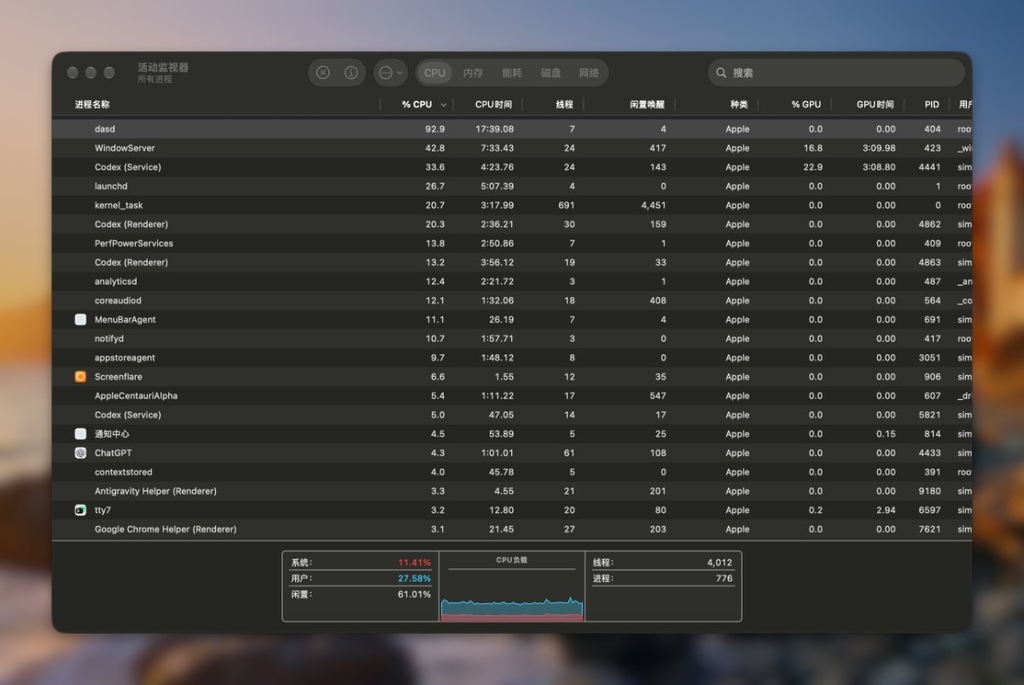
Today, my Mac (running the latest macOS 27.0 beta 8) suddenly started lagging. Opening Activity Monitor revealed that a system process named dasd was pinning a single CPU core at 90%–120%. A quick search yielded no useful answers. Tracing it down with Google Antigravity, I uncovered a hilarious blunder: an infinite loop caused by an Apple engineer handling time zones incorrectly.
TL;DR — Run this command directly:
defaults write com.apple.appstored ArcadePayoutResetDate \
  -date "$(date -v+3d -u +"%Y-%m-%dT%H:%M:%SZ")" && \
  killall appstoreagent
Troubleshooting Process with Google Antigravity
Conclusion & Current Status (BLUF)
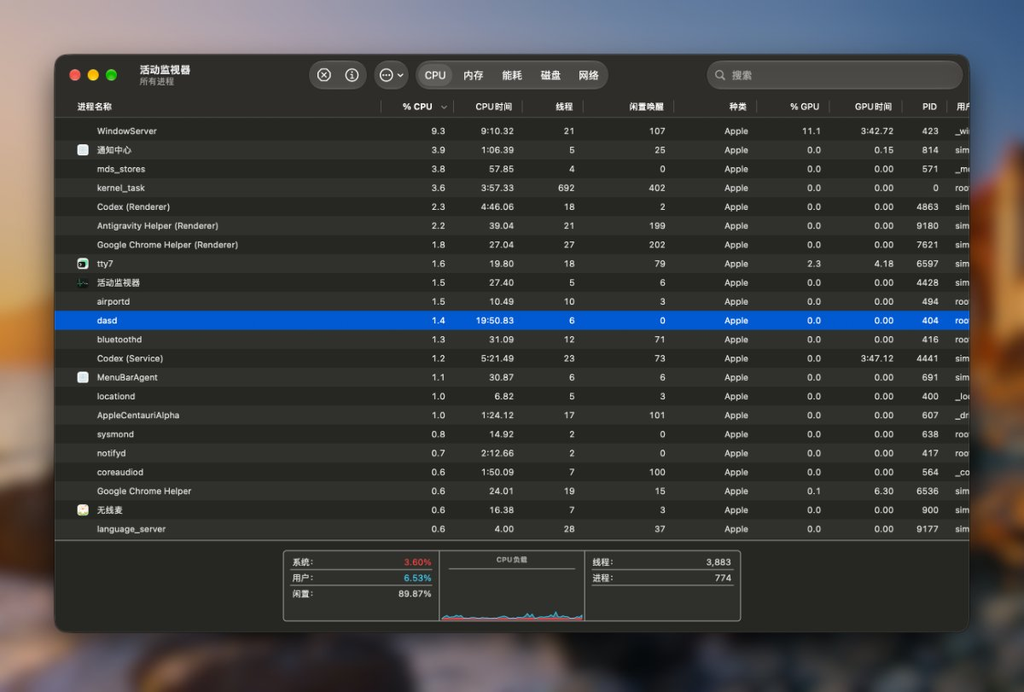
dasd continuously consuming 90%–99% CPU is not routine background system maintenance, but rather appstoreagent (the App Store background daemon) trapped in a hyperactive scheduling loop.
The root cause has been isolated and resolved. CPU usage for dasd dropped from 98.1% to 0.0%, and the system returned to normal without requiring a reboot.
Root Cause Analysis
Unified Logging System captures and process call traces provided clear evidence of the infinite loop:
- Offending Task:
com.apple.appstored.ArcadeResetPO(Apple Arcade payout metrics reset task). - Logic Flaw:
- The actual current time was in the afternoon, but
ArcadePayoutResetDateincom.apple.appstoredpreferences was pinned to midnight earlier that day:2026-09-06 00:00:00 +0800(a timestamp in the past). - After finishing the reset,
appstoreagentfailed to advance the timestamp to the next cycle (the following day). Instead, it re-registered the task using the already expired timestamp2026-09-06 00:00:00. - When
dasd(Duet Activity Scheduler) received the registration, it saw that the scheduled execution time was in the past, marked it as overdue, and triggered it immediately (Running immediately on submission). - Outcome: Over 400 dispatch and IPC events triggered per second, keeping
dasdpegging a full CPU core continuously.
- The actual current time was in the afternoon, but
Unified Log Trace
appstoreagent: [ArcadePayoutReset] Payout metrics reset with current payout reset time: 2026-09-06 00:00:00+0800
appstoreagent: [ArcadePayoutReset] Reset with reason: Rescheduling
appstoreagent: [ArcadePayoutReset] Using new date: 2026-09-06 00:00:00+0800 with reason: Rescheduling
appstoreagent: [ArcadePayoutReset] Activity not scheduled; submitting request
dasd:          SUBMITTING: 501:com.apple.appstored.ArcadeResetPO
dasd:          Running immediately on submission
dasd:          REQUESTING START: 501:com.apple.appstored.ArcadeResetPO
Mitigation & Verification
The loop was broken by manually pushing the scheduled date forward in user defaults and gracefully restarting appstoreagent:
- Command Executed:
defaults write com.apple.appstored ArcadePayoutResetDate -date "2026-09-06T16:00:00Z" && killall appstoreagent - Verification Results:
- Monitored via
top/ps:dasd(PID 404) CPU usage instantly fell to 0.0%. - After restarting,
appstoreagentsuspended normally and stopped flooding the system log at 400+ entries/sec.
- Monitored via
After working through the trace with Google Antigravity, CPU usage is back to normal.